Paging in Operating System
Paging is one of the core concepts of memory management, and it’s widely used in modern operating systems. In paging, a process is divided into fixed-size blocks called pages, and physical memory is divided into blocks of the same size called frames.
- Process does not have to be allocated in a contiguous memory space.
- The whole process does not have to be in main memory, some pages can be present and some pages can be loaded when needed. It allows more processes and even processes larger than main memory to run.
- Memory allocation is simplified as memory is always allocated in fixed sized pages.
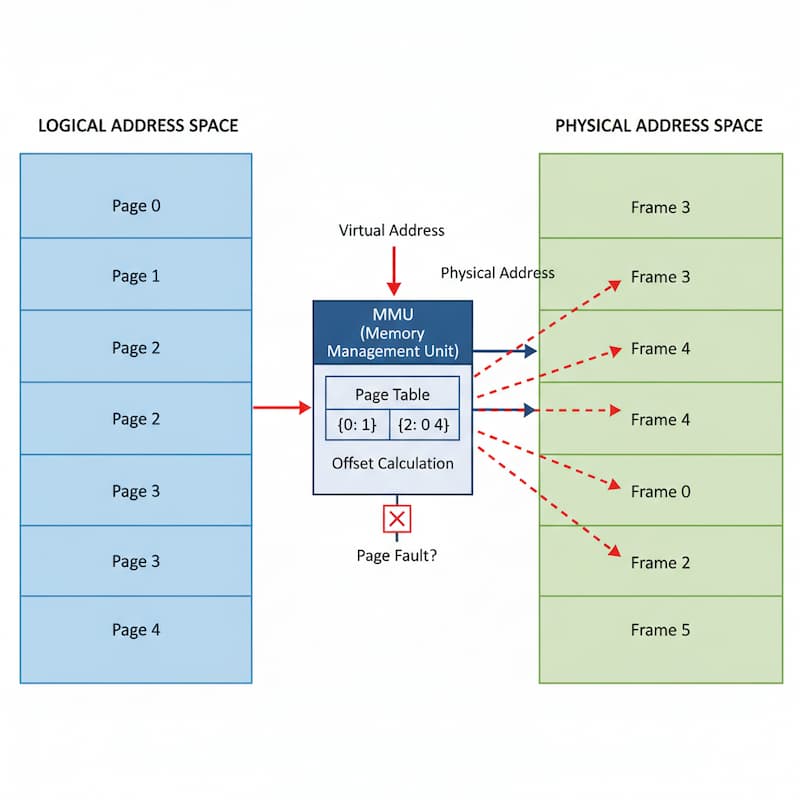
Page Table
A Page Table is a data structure maintained by the Operating System that stores the mapping between process pages (logical memory) and frames (physical memory). It ensures that even if a process’s pages are scattered across different frames, the OS can still correctly translate a logical address into a physical address.
- The CPU generates logical addresses in the form: [Page Number | Offset]
- The OS must convert this into a physical address in RAM: [Frame Number | Offset]
Structure of a Page Table:
- Frame Number: Where the page is stored in physical memory.
- Valid/Invalid Bit: Indicates if the page is currently in RAM (valid) or not (invalid → may be on disk).
- Protection Bits: Read/Write/Execute permissions.
- Modified (Dirty) Bit: Tells if the page has been written to (important for swapping).
- Referenced Bit: Shows if the page has been accessed recently (used in page replacement).
Working of Paging
Step 1: Divide Process and Memory
- Logical Memory (Process) is divided into fixed-size blocks called Pages.
- Physical Memory (RAM) is divided into blocks of the same size called Frames.
- Page size = Frame size (so pages fit exactly into frames).
Step 2: Page Table Maintained
- Each process has a Page Table.
- It stores the mapping between: Page Number (from logical address) → Frame Number (in physical memory).
Step 3: CPU Generates Logical Address
- Logical Address = [Page Number + Offset]
- Example: If Page size = 1 KB (1024 bytes) →
- Logical Address 2050 → Page = 2, Offset = 2
Step 4: Address Translation
- CPU extracts Page Number from the logical address.
- Page Table is checked to find the Frame Number for that page.
- Combine Frame Number + Offset → gives Physical Address.
- Access data from that physical location.
- The address generated by the CPU (logical address) is divided into Page number and Page offset
- A Physical Address is divided into two main parts Frame Number and Frame offset
Hardware implementation of Paging
The hardware implementation of the Page Table can be done using dedicated registers, but this method is only practical if the Page Table is small. For large Page Tables, the OS stores the table in memory and uses a Translation Lookaside Buffer (TLB) — a small, fast hardware cache — to speed up address translation by storing recently accessed page-to-frame mappings.
TLB (Translation Lookaside Buffer)
In paging, the CPU normally requires two memory accesses for every instruction:
- One access to the Page Table (to find the frame number).
- Another access to the physical memory (to fetch the actual data).
This doubles the memory access time and makes the system slower.
To solve this, a TLB is a special high-speed cache used by the CPU to store recent page table entries. If the required page-to-frame mapping is already present in the TLB (TLB hit), the translation is performed instantly, reducing memory access to just one step.
Advantages of Paging
1. Eliminates External Fragmentation
Paging divides memory into fixed-size blocks (pages and frames), so processes can be loaded wherever there is free space in memory. This prevents wasted space due to fragmentation.
2. Efficient Memory Utilization:
Since pages can be placed in non-contiguous memory locations, even small free spaces can be utilized, leading to better memory allocation.
3. Simplicity of Allocation:
Allocation and deallocation of memory become simple. OS only needs to find a sufficient number of free frames for the process.
4. Ease of Swapping:
Individual pages can be moved between physical memory and disk (swap space) without affecting the entire process, making swapping faster and more efficient.
5. Better CPU Utilization:
By allowing multiple processes in memory without worrying about fragmentation, CPU idle time is reduced. More processes can be kept in RAM, improving multiprogramming.
6. Supports Virtual Memory:
Paging enables the implementation of virtual memory, allowing processes to use more memory than physically available by swapping pages between RAM and secondary storage.
7. Provides Isolation and Protection
Each process has its own page table, so one process cannot directly access another’s memory. Protection bits in page table entries allow read, write, or execute permissions.
Disadvantages of Paging
1. Internal Fragmentation:
Each frame is fixed size, and the process pages must fit into frames. If the last page of a process is smaller than a frame, the unused part of the frame is wasted.
Example: Frame size = 4 KB, Page = 3.2 KB → 0.8 KB wasted in that frame.
2. Increased Overhead:
- Every process needs its own page table to maintain page–frame mappings.
- Large processes → large page tables → high memory overhead.
- If logical address space is huge, page tables can occupy a significant portion of memory.
3. Slower Memory Access (without TLB):
- Each memory access requires two steps:
- Lookup in Page Table (to get frame).
- Access physical memory (to get data)
- This doubles access time unless a TLB (Translation Lookaside Buffer) is used.
4. I/O Overhead During Page Faults:
When a required page is not in physical memory (page fault), it needs to be fetched from secondary storage, causing delays and increased I/O operations.
5. Hardware Complexity:
- Paging requires extra hardware support (MMU, TLB).
- Increases system cost and complexity.